Best CRM for a small agency in 2026
HubSpot is the best CRM for most small agencies in 2026 — the free tier is a genuine CRM, not a trial, and it scales into automation as you grow. If price-per-seat is your main worry, Zoho CRM does most of the job for a quarter of the cost. If you run client sub-accounts and white-label reporting, GoHighLevel is built specifically for that agency model.
If you've searched this, you're probably running an agency out of a mix of email, spreadsheets, sticky notes and memory — and something has just slipped through the cracks. A lead you forgot to chase, a client you forgot to invoice, a proposal that went quiet for three weeks because nobody was tracking it. That's the exact problem a CRM (short for "customer relationship management" software) exists to solve: it's a shared digital filing cabinet that remembers every contact, every conversation and every deal so your team doesn't have to.
This guide compares the three CRMs that actually make sense for a small agency in 2026, tells you plainly what each one is and does, walks through real scenarios so you can see yourself in the decision, and gives you a clear answer at the end — not a list of forty features you'll never use.
What a CRM actually does, in plain English
Strip away the marketing language and a CRM does three jobs: it stores every contact and company you deal with in one searchable place, it tracks where each deal or client relationship stands (a "pipeline" — new lead, in conversation, proposal sent, won or lost), and it reminds you to follow up so nothing goes cold. Everything else — email templates, automation, reporting, AI drafting — is built on top of those three jobs.
Before a CRM, most small agencies run this off a mix of a spreadsheet and memory. That works fine at three or four active conversations. It quietly breaks somewhere around eight to ten, which is exactly the size most small agencies hit within their first year — and that's usually the moment someone finally searches for "best CRM for a small agency" at 11pm after losing a deal they forgot about.
What HubSpot is and what it actually does
HubSpot is an all-in-one CRM and marketing platform. In practice, that means: a contact record for every person you deal with (their email history, calls, notes and deal status all in one place), a visual deal pipeline you drag cards across as work progresses, email tracking that tells you when a prospect opens your email, and — on paid tiers — automated follow-up sequences and AI-drafted emails. The free tier isn't a stripped-down trial; it's a genuinely usable CRM that many small agencies run on for years before ever paying a penny.
A concrete example: a three-person web design agency using HubSpot free might have 40 contacts, a five-stage pipeline (Enquiry, Discovery call, Proposal, Contract sent, Won), and one shared inbox connected to their info@ address so replies land against the right contact automatically. That's the entire setup — no consultant, no custom development, built by one person in an afternoon.
What Zoho CRM is and what it actually does
Zoho CRM is part of a much larger Zoho suite of business apps, sold as a standalone CRM at a considerably lower price than HubSpot's paid tiers. It covers the same core ground — contacts, pipeline, basic automation — plus a workflow-builder called "Blueprint" that lets you enforce a step-by-step process (for example, requiring a signed contract before a deal can move to "won," which stops sloppy record-keeping before it starts). It's a smaller ecosystem than HubSpot's, with fewer one-click integrations, but the core CRM functionality is genuinely solid for the price, and Zoho's wider suite (invoicing, email, forms) can replace several other small tools if you're willing to commit to the ecosystem.
What GoHighLevel is and what it actually does
GoHighLevel was built specifically for agencies that manage marketing or CRM on behalf of other businesses. Its standout feature is sub-accounts: you get one master account, and inside it you can spin up a separate, white-labelled CRM instance for each client — branded as your own software, not GoHighLevel's, right down to the domain the client logs into. If part of your agency's service is "we'll run your CRM and follow-ups for you," this is the only tool on this list built around that exact job. It also bundles funnel pages, appointment booking and SMS/email automation, all under one flat monthly fee regardless of how many contacts or client accounts you add — which matters because most competitors charge per contact, and that cost compounds fast once you're managing several clients' lists at once.
The three shapes of small agency, and which CRM fits each
Think of it like choosing a van. A general courier needs something flexible that does everything reasonably well — that's HubSpot: it fits almost any small agency's own sales process without much configuration. A cost-conscious operator running tight margins wants the same core capability for less money — that's Zoho: you give up some polish and some integrations, but the CRM basics are there at a fraction of the cost. An agency that resells software to its own clients (common in marketing and web agencies) needs a van with a false floor for someone else's cargo — that's GoHighLevel's sub-account system, which nothing else on this list really replicates.
Real scenarios: which one fits you?
You're a 3-person branding studio, mostly project-based work, a handful of active proposals at any time. Start with HubSpot free — you don't need sub-accounts or heavy cost optimisation yet, you need something simple that just works. You're a 10-person agency on tight margins, watching every subscription line. Zoho's price gap becomes real money at this size — a serious look is worth it once you're past HubSpot's free tier and staring down Professional pricing. You explicitly sell "we manage your CRM and lead follow-up for you" as a service to clients. GoHighLevel isn't optional here — nothing else on this list lets you resell a branded CRM instance per client without building it from scratch.
How to actually decide: a same-afternoon test
Don't overthink this. Sign up for HubSpot's free tier right now, and in the next 20 minutes: import your existing contacts (a CSV export from your email or spreadsheet works fine), create your deal pipeline stages (something like New lead → Discovery call → Proposal sent → Won/Lost), and log your three most recent client conversations as notes on their contact records. If that felt natural and you can picture your team using it daily, you're done — upgrade to Starter when follow-up chasing starts costing you deals. If you're wincing at HubSpot's paid pricing before you've even needed the automation, try the same 20-minute test in Zoho instead. And if what you actually need is to hand a working CRM to your clients under your own brand, skip both and trial GoHighLevel.
Common mistakes agencies make when picking a CRM
Three come up constantly: choosing based on a feature you'll use once a year rather than the thing you'll do fifty times a week (logging a call, checking a pipeline); building an elaborate custom pipeline with fifteen stages before entering a single real contact, which just delays adoption; and picking the tool a competitor uses without checking whether your agency's shape (project-based vs retainer, own pipeline vs reselling to clients) actually matches theirs.
Head to head
| HubSpot Winner | Zoho CRM | GoHighLevel | |
|---|---|---|---|
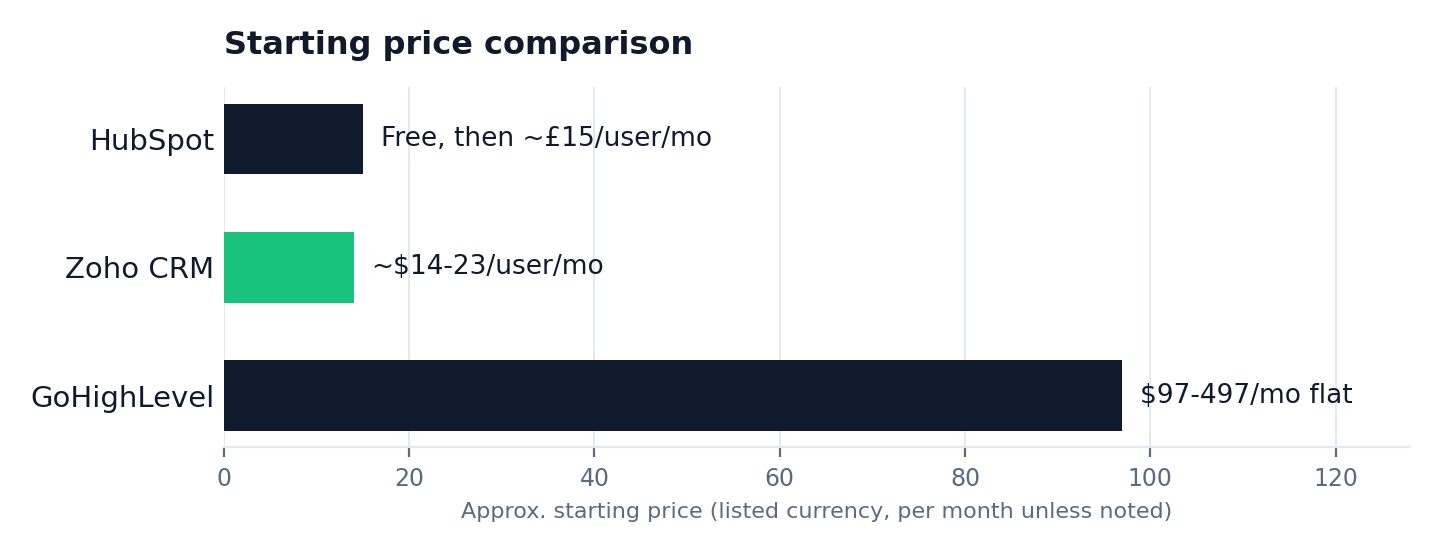
| Starting price | Free, then ~£15/user/mo | ~$14-23/user/mo | $97-497/mo flat |
| Best for | General agencies, ease of use | Budget-conscious teams | Agencies reselling to clients |
| Automation | Strong, AI-assisted | Good, Blueprint workflows | Strong, agency-focused |
| Integrations | Largest ecosystem | Solid, smaller than HubSpot | Native + Zapier |
| Sub-accounts / white-label | No | No | Yes, on every plan |
| Pricing model | Per user | Per user | Flat fee, unlimited contacts |
Frequently asked questions
What's the best free CRM for a small agency?
HubSpot's free tier is the strongest genuinely-free CRM — it isn't a trial, and most 2-5 person agencies can run on it indefinitely before needing to upgrade.
I've never used a CRM before — is this hard to set up?
No. Importing contacts is a CSV upload, and building your first pipeline is dragging a few labelled columns into place. Budget 20-30 minutes for a working first version, not a full day.
Is Zoho CRM good enough for an agency?
Yes, for agencies watching cost per seat. It covers most of HubSpot's core functionality — pipeline, automation, reporting — at roughly a quarter of the price at the professional tier.
Why would an agency choose GoHighLevel over HubSpot?
If your agency resells software or manages CRM on behalf of clients, GoHighLevel's built-in sub-accounts and white-labelling replace a service HubSpot simply doesn't offer.
Do I need to migrate everything at once?
No — most agencies start a CRM alongside their old spreadsheet, run both for two to four weeks on new leads only, then migrate historical contacts once they trust the new system.
Can I switch CRMs later if I pick wrong?
Yes, and it's less painful than people expect — contacts and deals export as a CSV from any of these three, though rebuilding custom automation takes a few hours of manual work in the new tool.
What happens if I outgrow the free tier?
You upgrade the specific things costing you money — usually automation and reporting — rather than starting over. See our HubSpot Free vs Starter comparison for exactly what changes.
The bottom line: start free on HubSpot unless you already know you need Zoho's pricing or GoHighLevel's sub-accounts — both are the exception, not the default. For a full walkthrough of getting a CRM live in your first week, see our step-by-step CRM setup guide, and if you're weighing HubSpot against a specific rival, we've compared it head-to-head against Zoho, Pipedrive and GoHighLevel individually.
The rest of this CRM series
This article is part of a full CRM series for small agencies: best CRM for a small agency, best CRM for consultants, HubSpot vs GoHighLevel, HubSpot vs Pipedrive, HubSpot vs Zoho, ActiveCampaign vs HubSpot, HubSpot's free CRM reviewed, HubSpot Free vs Starter, and how to set one up in a week.